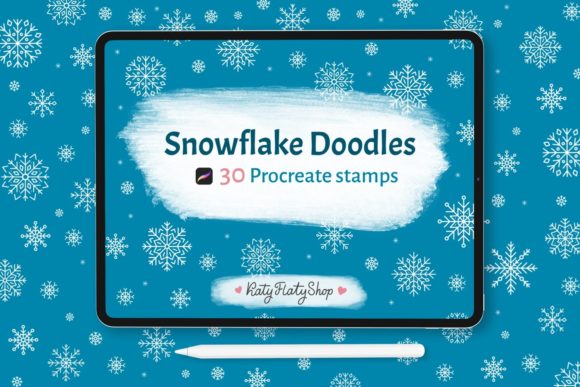
Mastering Winter Designs with 30 Snowflakes Procreate Stamps
The digital art landscape has evolved rapidly, offering creators tools that blend traditional aesthetics with modern efficiency. For iPad artists, seasonal design elements are no longer just about drawing from scratch; they are about leveraging smart assets to enhance workflow and creativity. This is where a curated collection of 30 Snowflakes Procreate Stamps becomes an indispensable resource. Whether you are a professional graphic designer working on holiday campaigns or a hobbyist looking to add a touch of winter magic to your digital journal, these stamps offer a versatile solution.
Winter-themed projects often demand intricate details. Drawing complex snowflake geometry by hand can be time-consuming and requires a steady hand. By integrating pre-made stamps into your toolkit, you bypass the repetitive labor while maintaining artistic control. The key lies in understanding how to manipulate these assets within the Procreate ecosystem to create unique, non-repetitive compositions that feel organic and handcrafted.
Understanding the Asset: Precision Meets Simplicity
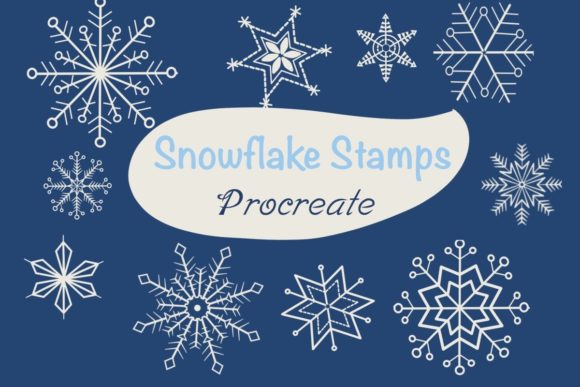
At the core of this digital bundle are two distinct categories: 30 Snowflakes Procreate Stamps and 30 Doodle snowflake Procreate stamps. While they share a thematic connection, their visual languages serve different purposes in design. The standard snowflake stamps typically feature more structured, symmetrical, and crystalline patterns. These are ideal for backgrounds, borders, or focal points where clarity and elegance are paramount. They mimic the scientific beauty of ice crystals, offering sharp lines and geometric precision.
In contrast, the doodle snowflakes bring a whimsical, hand-drawn charm. These stamps vary in line weight and structure, often appearing looser and more playful. They are perfect for adding texture to lettering, creating casual social media graphics, or designing greeting cards that feel personal and warm rather than corporate and cold. Having both styles in one package allows artists to mix and match, creating depth by layering structured crystals over loose doodles, or vice versa.
It is important to note a specific technical characteristic of these brushes: the stamps are not pressure sensitive. For some users, this might initially seem like a limitation, but in practice, it is a significant advantage for stamping workflows. Pressure sensitivity is crucial for painting and sketching, where line variation depends on how hard you press. However, for stamps, you want consistency. When you tap the screen, you want the full shape to appear clearly without fading or thinning out due to a light touch. This ensures that every snowflake lands with maximum impact and clarity, regardless of how quickly or lightly you tap.
Seamless Integration into Your Procreate Workflow
One of the most appealing aspects of digital brushes is the ease of installation. For those new to the platform, the process is straightforward. After downloading the .brushset file, simply open it directly on your iPad. The Procreate app, specifically version 5.0 and above, will automatically recognize the file format and install the brushes into your library. There is no need for complex unzipping, folder management, or manual importing. This instant accessibility means you can go from purchase to creation in a matter of seconds.
Compatibility is a major factor in choosing digital assets. These stamps are optimized for Procreate version 5.0 and later, ensuring they work smoothly with the latest features of the app. Whether you are using an older iPad model or the newest Pro, the performance remains stable. The lightweight nature of stamp brushes means they do not bog down your device, allowing for smooth scrolling and quick selection even when working on large, high-resolution canvases intended for print.
Customization: Color, Size, and Opacity
While the shape of the snowflake is fixed, your creative control is far from limited. The true power of these stamps lies in the ability to modify their attributes dynamically. You are not stuck with black-and-white outlines. By selecting the stamp and adjusting the color wheel, you can transform a simple outline into a icy blue accent, a warm gold highlight, or a vibrant pink decoration. This flexibility is essential for matching specific brand colors or thematic palettes.
Size adjustment is equally critical. Since the collection includes various designs, you may need a large, dominant snowflake for a poster header or a tiny, subtle crystal for a textured background. Using the two-finger pinch gesture or the size slider in the brush settings, you can scale any of the 30 Snowflakes Procreate Stamps to fit your composition perfectly. Furthermore, opacity control allows you to create depth. By lowering the opacity of background stamps, you can create a sense of atmospheric perspective, making foreground elements pop while keeping the background interesting but unobtrusive.
Practical Applications in Modern Design
The versatility of these stamps extends across numerous industries and creative projects. Here is how you can effectively incorporate them into your daily workflow:
- Social Media Content: In the fast-paced world of Instagram and Pinterest, visual appeal drives engagement. Use the doodle snowflakes to frame quotes, decorate story highlights, or add festive touches to product photos. The quick stamping process allows for rapid content creation during the busy holiday season.
- Digital Lettering and Calligraphy: Embellishing hand-lettered words with snowflakes adds a professional finish. Place smaller stamps around the ascenders and descenders of your letters. Because the stamps are not pressure sensitive, they sit cleanly on top of your lettering without interfering with the underlying stroke dynamics.
- Greeting Cards and Invitations: Whether designing for print or digital distribution, snowflakes are synonymous with winter celebrations. Use the structured snowflakes to create elegant borders for wedding invitations or holiday cards. The high resolution ensures that when printed, the lines remain crisp and clean.
- Banner and Web Design: For websites undergoing a winter refresh, these stamps can be used as subtle background textures. By setting a low opacity and scattering the stamps randomly, you create a snowy atmosphere that enhances user experience without distracting from the main content.
Tools of the Trade: Apple Pencil, Stylus, or Finger
A common question among new digital artists is whether specialized hardware is necessary. The beauty of stamp brushes is their accessibility. You do not need an Apple Pencil to use them effectively. While the Pencil offers precision for placement, you can achieve excellent results using any capacitive stylus or even your finger. This makes the 30 Doodle snowflake Procreate stamps ideal for on-the-go editing. If you are away from your desk and need to quickly mock up a design idea on your iPad, your fingertip is sufficient to place and resize these elements.
However, for intricate compositions where placement needs to be pixel-perfect, the Apple Pencil is recommended. Its tip allows for finer control when tapping small areas or aligning stamps along a specific path. Ultimately, the choice of tool depends on the level of precision required for your specific project, but the barriers to entry are remarkably low.
Maximizing Value Through Variety
Having access to sixty different variations—thirty structured and thirty doodle-style—prevents the "cookie-cutter" look that often plagues digital designs. When using stock elements, repetition is the enemy of authenticity. By mixing sizes, rotating the stamps using the transform tool, and alternating between the two styles, you can create scenes that look bespoke and original.
Consider the concept of layering. Start with a large, low-opacity structured snowflake in the background. Add mid-sized doodle snowflakes in the middle ground with varying colors. Finally, place small, high-opacity crisp snowflakes in the foreground to catch the eye. This technique mimics the natural depth of a snowfall and showcases the full potential of the brush set.
In conclusion, investing in a comprehensive set of winter-themed stamps is a strategic move for any iPad artist. It saves time, enhances visual appeal, and provides the flexibility needed for diverse projects. By mastering the simple controls of color, size, and opacity, you can transform these basic shapes into sophisticated design elements that elevate your work throughout the winter season and beyond.