Procreate Mandala Stamps Brush Guide
Digital art has evolved from simple sketches to complex, layered masterpieces, yet the desire for symmetry and intricate pattern remains timeless. The Procreate Mandala Stamps Brush set bridges the gap between manual precision and digital efficiency. This specialized toolset is designed exclusively for the Procreate ecosystem, offering artists a streamlined way to create radial designs, floral patterns, and organic textures without the tedious repetition of manual drawing.
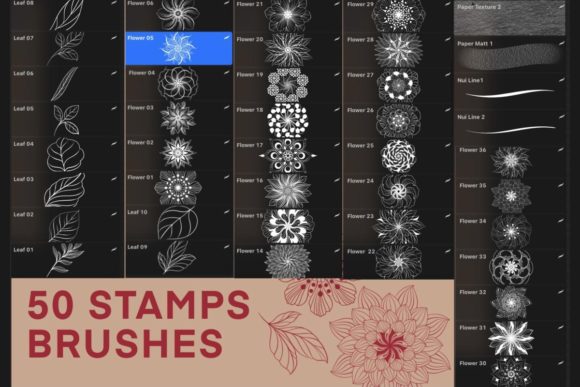
For those unfamiliar with stamp brushes, they function differently than standard painting tools. Instead of dragging a continuous line, you tap to place pre-designed elements. This specific collection includes 36 flower stamps, 10 leaf stamps, two pen brushes, and two paper texture brushes. Understanding how these components interact can significantly alter your workflow, whether you are a hobbyist looking to relax or a professional designer meeting a tight deadline.
Understanding the Toolset
Before diving into specific use cases, it is essential to understand what this package offers. The core of this product is the mandala functionality, which allows for symmetrical placement of elements. However, the inclusion of individual flower and leaf stamps provides flexibility beyond strict geometric patterns. The two pen brushes allow for fine detailing and outlining, while the paper brushes add a tactile, traditional feel to your digital canvas.
It is crucial to note the technical requirements. This brush set is ONLY FOR PROCREATE. It requires an iPad Pro or standard iPad paired with an Apple Pencil. Furthermore, your Procreate App must be version 5.0 or higher to ensure compatibility with the brush engine features used in these stamps. Without these specific tools, the brushes will not function as intended.
Why Beginners Find Value in Symmetry
For beginners, the intimidation factor of digital art often lies in proportion and symmetry. Drawing a perfect mandala by hand requires a steady hand and a deep understanding of geometry. The Procreate Mandala Stamps Brush removes this barrier. A novice user can create visually stunning, complex designs within minutes of installation.
The learning curve here is not about mastering anatomy or perspective, but rather about composition. Beginners can experiment with layering flowers and leaves, learning how opacity and blending modes affect the final image. This immediate gratification can be a powerful motivator, encouraging new artists to explore other aspects of the Procreate app. The included paper brushes also help beginners transition from physical media, providing a familiar texture that makes the digital environment feel less sterile.
Efficiency for Professionals and Freelancers
Professional illustrators and freelancers operate under different pressures. Time is money, and clients often request intricate patterns for textiles, wallpapers, or packaging. Manually drawing every petal in a floral repeat pattern is inefficient. Here, the Procreate Mandala Stamps Brush serves as a productivity multiplier.
A professional might use the 36 flower stamps to quickly block out a design concept. Once the layout is approved, they can use the two included pen brushes to refine edges or add custom details that differentiate the work from generic stock assets. The ability to toggle between stamping and freehand drawing allows for a hybrid workflow that balances speed with artistic integrity. For entrepreneurs and small business owners creating their own branding materials, this tool reduces the need to outsource pattern design, keeping costs low and creative control high.
Creative Exploration for Hobbyists and Creators
Hobbyists often seek digital art tools for relaxation and mindfulness. The repetitive nature of creating mandalas is known to have meditative qualities. Using the Procreate Mandala Stamps Brush allows users to enter a flow state, focusing on color combinations and arrangement rather than technical execution.
Bloggers and content creators also find unique applications for these stamps. Social media graphics often require eye-catching backgrounds or decorative elements. The leaf and flower stamps can be used to create borders for quotes, headers for blog posts, or decorative accents for digital planners. The two paper brushes are particularly useful here, allowing creators to overlay a textured background that makes digital designs feel more organic and less "computer-generated."
Educational Applications
Educators teaching digital art or design principles can use this toolset to demonstrate concepts of radial balance, repetition, and rhythm. Instead of spending an entire lesson on the mechanics of drawing a single symmetrical shape, teachers can use the Procreate Mandala Stamps Brush to show how individual elements contribute to a larger whole. Students can then focus on color theory and spatial arrangement. This shifts the educational focus from technical dexterity to design thinking, which is a valuable skill for any aspiring artist.
Evaluating Quality and Flexibility
When considering any digital asset, quality and flexibility are paramount. The value of this brush set lies in its variety. With 36 distinct flower stamps and 10 leaf variations, users avoid the monotony of repeating the same element. This diversity allows for more natural-looking compositions.
However, flexibility also depends on how well the stamps integrate with other tools. The inclusion of pen brushes is a thoughtful addition, acknowledging that stamps alone rarely finish a piece. Users can stamp a base pattern and then hand-draw additional details, creating a unique hybrid look. The paper brushes further enhance this by allowing users to simulate traditional media, adding depth and grain to the final export.
Practical Considerations for Buyers
Before purchasing, consider your hardware and software setup. As noted, this is strictly for Procreate on iPad. If you work primarily on desktop software like Photoshop or Illustrator, this tool will not be useful. Additionally, ensure your Apple Pencil is charged and calibrated, as pressure sensitivity may affect how the pen brushes interact with your stamps.
Think about your end goals. If you are looking to create precise, vector-based logos, raster-based stamps may not be the best fit due to resolution limitations when scaling. However, for illustrations, social media content, print-on-demand designs, and personal art projects, the resolution provided by modern iPads is more than sufficient.
- Check Compatibility: Ensure you have Procreate version 5.0 or higher.
- Define Your Use Case: Are you creating quick social graphics or detailed illustrations?
- Experiment with Layers: Use separate layers for stamps and hand-drawn details for maximum editability.
- Combine Textures: Utilize the paper brushes to add depth to flat stamp designs.
Integrating Stamps into Your Workflow
To get the most out of the Procreate Mandala Stamps Brush, integrate it into a broader workflow. Start by sketching a rough composition using the pen brushes. Then, use the flower and leaf stamps to fill in the main shapes. Adjust the opacity of the stamp layer to blend it with your sketch. Finally, add texture using the paper brushes on a top layer with a blending mode like "Overlay" or "Multiply." This layered approach ensures that your final piece retains a hand-crafted feel while benefiting from the speed of digital stamping.
For marketers and publishers, this workflow allows for rapid prototyping. You can test multiple color schemes and arrangements in a fraction of the time it would take to draw each variant manually. This agility is crucial in fast-paced industries where trends shift quickly.
Final Thoughts on Digital Symmetry
The Procreate Mandala Stamps Brush is more than just a collection of clipart; it is a tool that democratizes complex design. Whether you are a beginner seeking confidence, a professional needing efficiency, or a hobbyist looking for relaxation, this set offers tangible benefits. By understanding its capabilities and limitations, you can decide if it aligns with your creative goals. Remember, the tool is only as good as the vision behind it. Use these stamps as a foundation, not a crutch, and let your unique style shine through the symmetry.