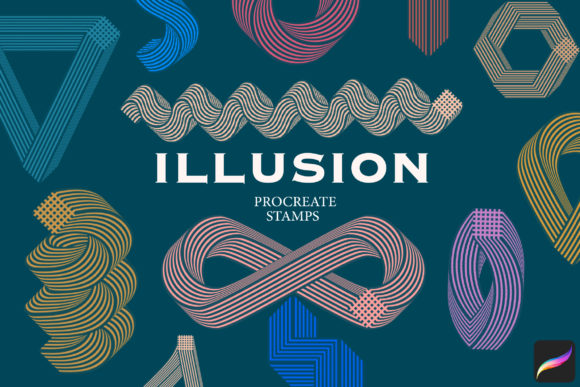
Unlock Magic with Illusion Procreate Stamps
Digital art thrives on the balance between technical precision and spontaneous creativity. For iPad artists, finding tools that bridge this gap can transform a good illustration into something truly captivating. Illusion Procreate Stamps offers exactly that kind of transformative potential. This specialized brush set is designed not just to add texture, but to introduce depth, mystery, and visual intrigue to your digital canvas. Whether you are a seasoned illustrator, a graphic designer working on client projects, or a hobbyist exploring new styles, these eighteen unique brushes provide a versatile toolkit for elevating your work.
The core appeal of this pack lies in its ability to simplify complex visual effects. Instead of spending hours manually layering textures or adjusting opacity masks to create a sense of atmospheric depth, you can achieve similar results with a single stroke. This efficiency allows creators to focus more on composition and storytelling, rather than getting bogged down in repetitive technical tasks. The brushes are crafted to interact naturally with the Apple Pencil, responding to pressure and tilt to produce organic, unpredictable results that feel hand-made rather than digitally generated.
Understanding the Creative Potential
When we talk about "illusion" in digital art, we are often referring to techniques that trick the eye or create a sense of three-dimensionality on a two-dimensional screen. Illusion Procreate Stamps leverages this concept by providing stamps that mimic light leaks, double exposures, grainy overlays, and ethereal glows. These elements are crucial for adding mood to an piece. A flat character portrait can suddenly gain emotional weight when surrounded by a subtle, dreamlike haze. A landscape sketch can feel more immersive when layered with realistic atmospheric particles.
The set contains 18 unique brushes, each serving a distinct purpose. Some are designed for broad, sweeping background effects, while others are finer, intended for detailed accent work. This variety ensures that you are not limited to a single aesthetic. You might use one stamp to create a vintage film grain effect for a nostalgic editorial illustration, and another to add sharp, geometric glitches for a modern, cyberpunk-themed design. The flexibility of the pack means it can adapt to various artistic directions, from minimalism to maximalism.
Practical Applications for Different Creators
Different professionals can leverage these tools in unique ways. For illustrators and concept artists, these stamps are invaluable for rapid prototyping. When pitching ideas to clients, being able to quickly establish mood and lighting can make a concept feel more finished and compelling. Using illusion stamps allows you to suggest lighting conditions and atmospheric perspective without rendering every detail, saving time during the iterative design process.
Graphic designers and marketers will find these brushes useful for creating standout social media assets. In a feed saturated with clean, vector-based graphics, an image with textured, organic overlays stands out. You can use the stamps to add subtle noise or light flares to product photography composites, giving them a cohesive, branded look that feels tactile and premium. This approach helps humanize digital content, making it feel less sterile and more engaging to audiences who crave authenticity.
Educators and content creators can also benefit. If you are designing presentation slides, e-book covers, or educational infographics, adding subtle visual interest can help retain viewer attention. The key is moderation; using these stamps as background elements or framing devices can guide the eye without distracting from the core information. The goal is to enhance readability and aesthetic appeal, not to overwhelm the viewer.
Mastering the Workflow
To get the most out of Illusion Procreate Stamps, it is essential to understand how they integrate into your existing workflow. These are not standalone solutions but rather enhancers. The best results come from layering. Start with your base illustration or design. Once your primary elements are in place, create a new layer above them. Select a stamp from the pack and experiment with different blending modes. Modes like "Overlay," "Soft Light," and "Screen" are particularly effective for illusionary effects, as they allow the underlying colors to show through while adding texture and luminosity.
Opacity control is another critical factor. Rarely will you want a stamp at 100% opacity. Dialing it back to 20–40% often yields the most sophisticated results. This subtlety ensures that the effect supports the artwork rather than dominating it. Additionally, consider using the eraser tool with a soft brush to mask out parts of the stamp. This technique allows you to apply the effect selectively, perhaps keeping it strong in the corners to vignette the image, while keeping the central subject clear and focused.
Consistency is key when working on a series of images. If you are creating a set of social media posts or chapters for a comic, choose two or three favorite stamps from the pack and stick with them. This creates a visual thread that ties your work together, establishing a recognizable style. Randomly switching between all 18 brushes in a single project can lead to a disjointed look. Curating your subset helps maintain professional coherence.
Technical Requirements and Installation
Before diving into creation, ensure your technical setup is ready. It is important to note that Illusion Procreate Stamps are compatible only with the iOS app Procreate for iPad. They will not work in Photoshop, Clip Studio Paint, or other digital drawing software. This exclusivity ensures that the brushes are optimized for the specific engine and touch interface of Procreate, guaranteeing smooth performance and accurate pressure sensitivity.
The installation process is straightforward but requires attention to detail. The brushes are provided as a .brushset file, which is a modern format that allows for easier management compared to older single .brush files. To install:
- Download the brushset file to your iPad.
- Open the Procreate app.
- Navigate to the Brush Library.
- Tap on any existing brush set to open the menu.
- Select "Import" and choose the downloaded
.brushsetfile. - The 18 brushes will appear as a new set in your library.
Make sure you have the latest version of Procreate installed. Older versions may not support the .brushset format correctly, leading to import errors or missing features. An included PDF installation guide is available for download if you encounter any issues, providing step-by-step visual instructions.
Regarding hardware, while the brushes will function on various iPad models and with third-party styluses, the experience is optimized for the Apple Pencil. The brushes were created and tested using the Apple Pencil, particularly in combination with the iPad Pro. This combo offers the highest level of precision and accuracy, ensuring that pressure curves and tilt responses behave exactly as intended. If you use a third-party stylus, you may notice slight variations in responsiveness. While functional, the nuanced control offered by the Apple Pencil allows for a more intuitive and expressive drawing experience.
Keeping Your Art Original
A common concern when using pre-made brushes is the fear of producing generic-looking art. However, tools are only as good as the artist wielding them. Illusion Procreate Stamps provides the raw material, but your composition, color choices, and subject matter define the final outcome. To keep your work original, avoid using the stamps as crutches. Do not rely on them to fix poor underlying drawings. Instead, use them to enhance strong fundamentals.
Experiment with combining multiple stamps. Layering a grain texture over a light leak can create a complex, unique effect that no single brush could achieve alone. Adjust the hue and saturation of the stamp layer to match your color palette. By customizing the color and blend mode, you ensure that the effect feels integrated into your specific piece, rather than slapped on top. This level of customization ensures that even if another artist uses the same pack, their results will look distinctly different from yours.
Ultimately, Illusion Procreate Stamps is about expanding your visual vocabulary. It invites you to play with light, texture, and atmosphere in ways that might be difficult to achieve manually. By integrating these tools thoughtfully into your workflow, you can streamline your process, add professional polish to your projects, and discover new creative avenues that inspire both you and your audience.