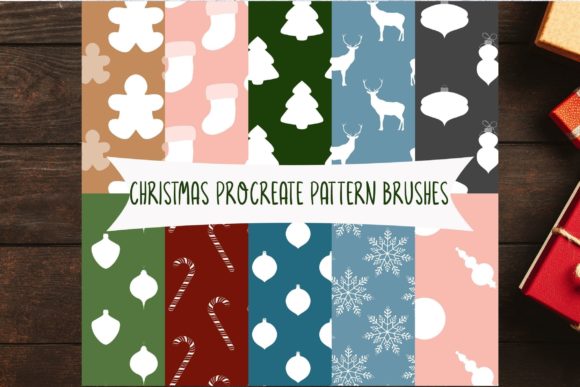
Unwrap Holiday Creativity: Mastering the Procreate Brush Set Christmas Patterns
The holiday season brings a unique pressure for digital artists, illustrators, and designers. Whether you are crafting custom greeting cards, designing social media assets, or creating festive packaging mockups, the demand for high-quality, seasonal visuals spikes dramatically. In this fast-paced environment, efficiency is just as crucial as artistic talent. This is where a specialized tool like the Procreate Brush Set Christmas Patterns becomes an indispensable asset in your digital toolkit. By streamlining the creation of intricate holiday motifs, this collection allows creators to focus on composition and storytelling rather than getting bogged down in repetitive detailing.
Why Specialized Brushes Matter in Digital Illustration
Digital art has evolved far beyond simple sketching. Today, it encompasses complex texturing, pattern design, and rapid prototyping. However, creating seamless, aesthetically pleasing patterns from scratch can be time-consuming. Drawing individual snowflakes, holly leaves, or knit textures manually for every project is not only tedious but can lead to inconsistent results. A dedicated brush set solves this problem by providing pre-engineered stamps and textures that maintain visual coherence while offering variety.
The Procreate Brush Set Christmas Patterns is designed specifically to address these workflow bottlenecks. It transforms the iPad into a powerful holiday design studio, allowing users to generate professional-grade festive backgrounds and elements with a single stroke. For professionals working against tight December deadlines, this capability is not just a convenience; it is a productivity multiplier.
Exploring the Collection: 22 Unique Tools plus a Bonus
This comprehensive set includes 22 distinct brushes, each crafted to capture the essence of the winter holidays. The variety within the pack ensures that you are not limited to a single aesthetic. From classic red-and-green traditional motifs to modern, minimalist winter designs, there is a tool for every style.
One of the standout features of this collection is the inclusion of two brushes that generate two-colored patterns. This functionality is particularly valuable for designers who need immediate contrast and depth without layering multiple elements manually. These dual-tone brushes can create instant visual interest, mimicking the look of woven fabrics, candy canes, or layered paper crafts. They reduce the number of steps required to achieve a polished look, making them ideal for quick turnarounds.
Additionally, the set comes with a bonus Gingerbread jitter brush. This playful addition adds a touch of whimsy and texture, perfect for illustrating cookies, adding rough edges to shapes, or creating organic, hand-drawn effects that break up the rigidity of digital lines. The "jitter" effect introduces randomization, ensuring that no two strokes look exactly alike, which helps maintain a natural, hand-crafted feel in your artwork.
Seamless Integration with the iPad Ecosystem
It is important to note that this Procreate Brush Set Christmas Patterns is exclusively compatible with the Procreate app. Consequently, it requires an iPad environment to function. This includes the standard iPad, iPad Pro, iPad Air, and iPad Mini. This exclusivity is actually a benefit, as Procreate is widely regarded as the industry standard for raster-based digital painting on mobile devices, offering a robust engine that handles complex brush dynamics with ease.
The installation process is designed to be straightforward, ensuring that you can start creating almost immediately after purchase. You will receive a zip file containing all the brush files. Here is how the workflow typically looks:
- Download: Save the zip file directly to the "Files" app on your iPad.
- Unzip: Tap on the downloaded file within the Files app to extract its contents.
- Import: Click on the unzipped brush file. Procreate will automatically detect the format and import the set.
- Create: Open Procreate, and you will find the new brush set appearing at the very top of your Brush Library, ready for use.
This seamless integration means there is no need for complex software installations or desktop transfers. Everything happens on-device, allowing for a truly mobile creative experience. Whether you are commuting, traveling, or relaxing at home, your holiday design studio is always with you.
Practical Applications for Modern Creators
The versatility of the Procreate Brush Set Christmas Patterns extends across various industries and creative pursuits. Here are several ways artists and designers are leveraging this tool:
- Greeting Card Design: Create unique, personalized holiday cards for clients or friends. Use the pattern brushes to build intricate borders or backgrounds, then overlay hand-lettered messages.
- Social Media Content: Stand out during the crowded holiday marketing season. Generate eye-catching posts, stories, and headers for Instagram, Pinterest, and Facebook without spending hours on graphic design software.
- Surface Pattern Design: Test ideas for wrapping paper, fabric prints, or textile designs. The ability to quickly visualize repeating patterns helps in refining concepts before moving to production.
- Digital Scrapbooking: Enhance digital journals and planners with festive stickers and backgrounds. The jitter brush, in particular, adds a tactile quality that mimics physical scrapbook materials.
- Concept Art and Illustration: Add atmospheric details to larger illustrations. Use the snow and texture brushes to establish mood and setting in character scenes or landscape paintings.
Maximizing Your Workflow with Pattern Brushes
To get the most out of this set, consider combining different brushes within the same piece. For instance, you might use one of the two-colored pattern brushes for a sweater texture on a character, while using the Gingerbread jitter brush to add rough, cozy outlines to the illustration. Layering these elements with varying opacities and blend modes in Procreate can yield surprising and sophisticated results.
Another key consideration is scale. Procreate allows you to adjust the size of your brush stamps dynamically. Experiment with scaling the patterns up for bold, graphic statements or down for subtle, textured backgrounds. Remember that the two-colored patterns can often be recolored using Procreate’s hue and saturation adjustments, giving you even more flexibility beyond the default color schemes.
Furthermore, because these brushes are vector-free raster stamps, they perform best when used at appropriate resolutions. Ensure your canvas size is suitable for your intended output—whether that is high-resolution print work or screen-based digital content. This ensures that the crisp details of the Christmas patterns remain sharp and professional.
Choosing the Right Tools for Holiday Projects
When selecting digital assets, creators often look for reliability, ease of use, and aesthetic quality. The Procreate Brush Set Christmas Patterns meets these criteria by offering a curated selection that avoids the clutter of unnecessary extras. With 22 focused brushes and a fun bonus tool, it provides enough variety to keep projects fresh without overwhelming the user with hundreds of redundant options.
Moreover, the specific compatibility with iPad and Procreate ensures that users are leveraging a stable, optimized platform. There are no compatibility issues with desktop-only software or cross-platform glitches. What you see on your iPad screen is what you get, providing a reliable preview of your final artwork.
In conclusion, integrating this brush set into your holiday workflow can significantly enhance both the speed and quality of your festive creations. It empowers you to produce professional, pattern-rich designs with minimal effort, leaving you more time to enjoy the season. Whether you are a seasoned illustrator or a hobbyist looking to add some sparkle to your digital journals, these tools offer a delightful way to celebrate creativity during the most wonderful time of the year.