60 Procreate Shape Brushes: A Practical Evaluation for Digital Designers
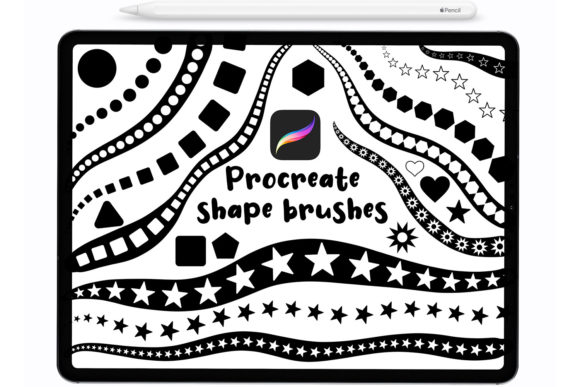
Digital illustration has evolved significantly with the advent of powerful tablet applications, yet the fundamental need for efficient workflow tools remains constant. For artists using Procreate on iPad, the 60 Procreate Shape brush set represents a specific category of digital assets designed to streamline the creation of geometric and organic forms. This collection includes a comprehensive suite of sixty distinct stamps and shapes, intended to assist designers in producing lovely designs without the repetitive manual effort often required for complex patterns or standard geometries.
Understanding whether this specific brush pack aligns with your artistic workflow requires an objective look at its features, compatibility, and practical application. This evaluation explores the utility of these tools, helping you determine if they are a necessary addition to your digital toolkit or if alternative methods might better serve your creative goals.
Understanding the 60 Procreate Shape Collection
The core value proposition of the 60 Procreate Shape set lies in its versatility and ease of use. Unlike standard drawing brushes that rely solely on stroke dynamics, this collection functions primarily as a stamping system. Each of the sixty brushes is engineered to place a predefined shape onto the canvas with a single tap or stroke. These shapes range from basic geometric forms to more intricate design elements, providing a foundational library for graphic design, pattern making, and illustrative accents.
A critical technical feature of these brushes is their pressure sensitivity. While traditional stamps are often static, these Procreate brushes respond to input pressure, allowing for dynamic variation in size and opacity. This means that a light tap might produce a small, faint shape, while a firm press generates a larger, more opaque instance. This responsiveness is crucial for maintaining an organic feel in digital work, preventing designs from appearing overly rigid or computer-generated.
Compatibility and Hardware Considerations
Before investing time in learning a new brush set, compatibility is a primary concern for users. The 60 Procreate Shape brushes are compatible with Procreate version 4.1 and above. This broad compatibility ensures that users with older iPads or those who have not updated to the latest operating system can still utilize the full functionality of the set. However, users should always ensure their app is updated to avoid potential glitches related to newer iOS features.
Regarding hardware, the flexibility of this set is a notable advantage. The brushes are designed to work seamlessly with the Apple Pencil, which offers the highest precision and pressure sensitivity. However, they are also fully functional with third-party styluses that support pressure data. Perhaps most importantly for casual users or those without specialized hardware, these stamps can be used effectively with a finger. While finger painting lacks the fine motor control of a stylus, the stamping nature of these shapes mitigates some of the precision issues, making them accessible to a wider audience.
Customization and Workflow Integration
The utility of any digital brush is largely determined by how well it integrates into existing workflows. The 60 Procreate Shape set allows for extensive customization. Users can change the color, size, and opacity of these Procreate brushes in real-time. This flexibility is essential for layering and composition. For instance, a designer might use a large, low-opacity shape as a background texture and overlay smaller, high-opacity shapes for focal points.
This level of control supports a non-destructive workflow. By adjusting opacity and size rather than permanently altering the shape’s structure, artists can experiment with different compositions rapidly. This is particularly beneficial for creating lovely designs where balance and harmony are key. The ability to tweak parameters on the fly reduces the need for multiple layers or complex masking techniques, thereby speeding up the design process.
Benefits and Practical Applications
There are several scenarios where the 60 Procreate Shape set proves to be a strong fit. First, it is highly effective for pattern design. Creating repeating geometric patterns manually is time-consuming and prone to inconsistency. Using these stamps ensures uniformity while allowing for random variations in placement and opacity, resulting in more natural-looking textures.
Second, the set is valuable for graphic design elements such as social media templates, invitations, and posters. The pre-made shapes provide a quick way to add decorative borders, dividers, or accent pieces. For educators or content creators who need to produce visual aids quickly, these brushes offer a reliable source of consistent iconography and symbols.
Third, the pressure-sensitive nature of the brushes makes them suitable for expressive illustration. Artists can use the shapes to build up complex forms, such as foliage, clouds, or abstract backgrounds, by varying the pressure and angle of the stroke. This technique adds depth and dimension to illustrations that might otherwise appear flat.
Tradeoffs and Limitations
Despite their advantages, there are tradeoffs to consider. The primary limitation of any stamp-based brush set is the potential for repetitiveness. If overused without variation in color, size, or rotation, designs can look generic. Artists must actively engage with the customization options to avoid this pitfall. Additionally, while the set includes sixty shapes, it may not cover every specific niche requirement. Users looking for highly specialized or industry-specific symbols might find the generalist nature of the set limiting.
Another consideration is the learning curve associated with pressure sensitivity. Users accustomed to static stamps may need practice to master the control required for nuanced results. Furthermore, while finger usage is supported, it lacks the precision needed for detailed work. Therefore, for professional-grade output, a stylus is strongly recommended.
When to Consider Alternatives
While the 60 Procreate Shape set is versatile, it may not be the best choice for every project. If your work relies heavily on freehand sketching or organic line work, traditional drawing brushes with varied textures and grain settings may be more appropriate. Similarly, if you require vector-like scalability and precision, dedicated vector graphic software might be a better fit, as Procreate is a raster-based application.
Additionally, if you already possess a large library of custom brushes or prefer creating your own shapes from scratch, the value added by this set may be marginal. In such cases, investing time in learning advanced Procreate features like Shape Guides or QuickShape might offer more long-term benefits than acquiring pre-made stamps.
Making the Decision
Ultimately, the decision to incorporate the 60 Procreate Shape brushes into your workflow depends on your specific needs. If you frequently create pattern-based designs, need quick decorative elements, or want to enhance the efficiency of your digital illustration process, this set offers a practical solution. Its compatibility with various hardware and Procreate versions makes it an accessible option for both beginners and experienced artists.
However, if your style is strictly freehand or you require highly specialized vector graphics, you may find limited utility in this collection. Evaluating your current workflow bottlenecks can help determine if these stamps address a genuine pain point. For many designers, the ability to rapidly prototype and iterate on lovely designs using pressure-sensitive, customizable shapes provides a significant competitive advantage in speed and consistency.