Streamline Your Digital Art with the Sun Flower Procreate Brush Stamp
If you have ever spent twenty minutes trying to draw a perfect sunflower only to realize the perspective is slightly off, you know how quickly momentum can die in digital illustration. The Sun Flower Procreate Brush Stamp offers a practical solution to this common creative bottleneck. This isn’t just about taking shortcuts; it is about reclaiming your time and energy for the parts of design that truly require your unique touch. By integrating these ten specialized stamps into your workflow, you transform a tedious manual process into a swift, enjoyable experience that keeps your creative flow intact.
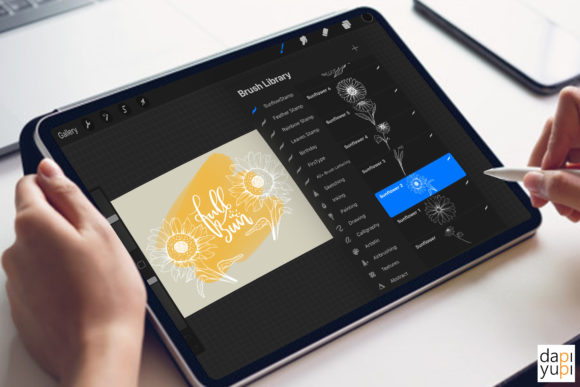
These brushes are designed specifically for the Procreate app on iPad and iPad Pro. They function not as traditional painting tools that rely on pressure sensitivity for stroke width, but as instant graphical elements. You select the brush, choose your desired color and opacity, resize the stamp to fit your composition, and tap to place it. It is a simple mechanic, but its impact on productivity is significant. Whether you are a seasoned illustrator, a small business owner creating social media content, or a hobbyist journaling on your tablet, understanding how to leverage these assets can elevate the quality and consistency of your work.
Why Speed and Consistency Matter in Digital Design
In the fast-paced world of digital content, speed often dictates output. For entrepreneurs and marketers, the ability to produce high-quality visuals quickly is a competitive advantage. When you are designing an Instagram story, a Pinterest pin, or a promotional flyer, you rarely have the luxury of spending hours on intricate botanical details. This is where the Sun Flower Procreate Brush Stamp becomes an essential tool in your kit.
Using pre-made stamps ensures visual consistency across a brand’s materials. If you are running a seasonal campaign for a bakery, a florist, or a lifestyle blog, using the same style of sunflower across multiple graphics creates a cohesive look. Manually drawing each flower might result in slight variations in style or proportion, which can look unintentional rather than artistic. With these stamps, every sunflower shares the same structural integrity, allowing you to focus on layout, typography, and color harmony instead of repetitive drawing tasks.
Real-World Applications for Creators and Businesses
The versatility of these ten sunflower stamps extends far beyond simple digital paintings. Here is how different users can integrate them into their daily workflows:
- Social Media Managers and Bloggers: Create eye-catching headers for blog posts or decorative elements for Instagram carousels. A sunflower stamp can frame a quote, highlight a key statistic, or add a warm, organic feel to a minimalist layout. Because you can adjust the opacity, you can use these stamps as subtle watermarks or background textures without overpowering your text.
- Invitation and Stationery Designers: Wedding invitations, birthday cards, and baby shower announcements often feature floral motifs. Drawing these by hand for every client project is time-consuming. Using the Sun Flower Procreate Brush Stamp allows you to build complex floral arrangements quickly. You can layer different stamps, rotate them, and change colors to match specific theme palettes, delivering professional results in a fraction of the time.
- Digital Journalers and Planners: For those who use GoodNotes or Procreate for digital planning, these stamps add a personalized touch to daily logs. Instead of searching for clipart online and importing it, you can stamp a sunflower directly onto your page to mark a special occasion, decorate a weekly spread, or simply add a bit of joy to your morning routine.
- Educators and Content Creators: Teachers creating digital worksheets or educational materials can use these graphics to make learning resources more engaging. A sunflower border can frame a math problem set, or individual stamps can be used as rewards or markers in interactive lessons.
Technical Requirements and Compatibility
Before purchasing or downloading any digital asset, it is crucial to understand the technical environment required for it to function. The Sun Flower Procreate Brush Stamp is exclusively compatible with the Procreate app. This means you must have an iPad or iPad Pro with the Procreate application installed. Specifically, you need Procreate App Version 5.0 or higher. Older versions of the software may not support the .brushset file format or the specific engine features used to create these stamps.
It is important to note that these brushes DO NOT work in Photoshop, Illustrator, Clip Studio Paint, or any other desktop or mobile design application. They are native to the Procreate ecosystem. If your primary workflow involves Adobe Creative Cloud, these assets will not be useful to you. However, if you are already invested in the Apple iPad ecosystem for creativity, these brushes integrate seamlessly into your existing library.
Upon purchase, you will receive a single .brushset file. This file contains all ten sunflower variations. Installing them is straightforward: simply tap the file on your iPad, and it will automatically open in Procreate, adding the new brushes to your selected brush set. This ease of installation removes technical barriers, allowing you to start creating immediately.
Maximizing the Potential of Your Stamps
To get the most out of these tools, consider how you manipulate their properties within Procreate. While the shape is predefined, your creative control lies in customization. Here are a few practical tips:
- Experiment with Opacity: Lowering the opacity can create a dreamy, layered effect. Try stacking multiple sunflower stamps at low opacity to build a dense, textured background that doesn’t distract from foreground elements.
- Color Variation: Don’t limit yourself to yellow and green. Sunflowers can be stylized in monochrome, pastels, or even neon hues depending on your project’s aesthetic. Use the color picker to match your brand guidelines exactly.
- Rotation and Scaling: Avoid a repetitive look by rotating each stamp. A natural floral arrangement rarely has flowers facing the exact same direction. Mix large, dominant stamps with smaller, subtler ones to create depth and visual interest.
- Layer Management: Keep your stamps on separate layers or group them logically. This allows you to move individual elements later if your composition changes, providing flexibility during the editing process.
Is This Tool Right for You?
Deciding whether to invest in a specific brush set comes down to your current needs and workflow. If you frequently find yourself stuck on repetitive decorative elements, or if you need to produce volume without sacrificing quality, the Sun Flower Procreate Brush Stamp is a logical addition to your toolkit. It is particularly valuable for those who value efficiency and consistency.
However, if you are looking to improve your fundamental drawing skills or prefer the organic imperfections of hand-drawn lines for every single element, you might prefer to sketch your own florals. These stamps are tools for enhancement and acceleration, not replacements for learning anatomy or perspective. They are best used by individuals who already have a clear vision for their designs and need efficient ways to execute them.
Ultimately, digital art is about finding the right balance between technique and technology. These ten sunflower stamps offer a reliable, high-quality way to inject warmth and professionalism into your projects. By reducing the friction of creation, they allow you to focus on what matters most: sharing your message and connecting with your audience through beautiful, thoughtful design.