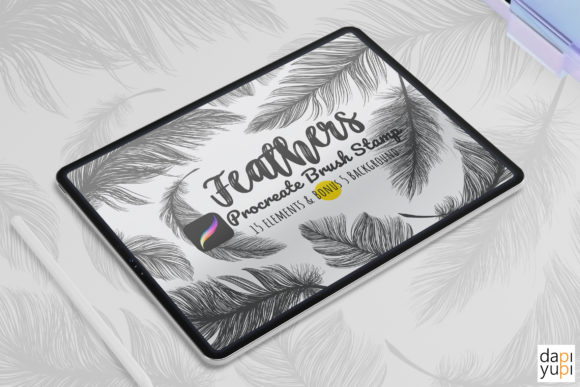
Streamlining Digital Illustration with the Procreate Brush Stamp Set Feathers DIY
In the evolving landscape of digital illustration, efficiency is often just as critical as artistic talent. For professionals, hobbyists, and entrepreneurs alike, the ability to produce high-quality visual assets quickly can define the success of a project. This is where specialized tools like the Procreate Brush Stamp Set Feathers DIY become invaluable. Rather than serving merely as decorative elements, these stamps represent a strategic asset in a designer’s workflow, allowing for rapid iteration and consistent aesthetic quality across various media.
The integration of stamp brushes into a digital toolkit is not about replacing hand-drawn skills but enhancing them. By utilizing pre-designed elements such as feathers and leaves, creators can focus their energy on composition, color theory, and narrative structure, while relying on these assets to handle repetitive detailing. This article explores how to effectively incorporate this specific brush set into your creative process, ensuring that you maximize both productivity and artistic integrity.
Understanding the Tool and Its Technical Requirements
Before integrating any new asset into your workflow, it is essential to understand its technical boundaries and capabilities. The Procreate Brush Stamp Set Feathers DIY is a specialized collection designed exclusively for the Procreate application on iPad. It consists of 15 distinct stamp brushes, primarily featuring feathers and leaves, crafted to provide an aesthetic and organic feel to your artwork.
Compatibility is the first hurdle in any digital workflow. To use these brushes effectively, you must have an iPad or iPad Pro with the Procreate app installed. Specifically, the app version must be 5.0 or higher. This requirement ensures that the brush engine can properly interpret the stamp data, allowing for smooth rendering and responsiveness. It is crucial to note that these brushes are not compatible with Photoshop, Clip Studio Paint, or other desktop-based illustration software. They are native to the iOS ecosystem, leveraging the touch interface and Apple Pencil precision that Procreate offers.
Upon purchase, you will receive a single .brushset file. This format is designed for easy installation. Once imported, the 15 stamps appear in your brush library, ready for immediate use. Understanding this simplicity is key; there is no complex configuration required. The tool is plug-and-play, which reduces the friction often associated with adopting new digital resources.
Strategic Placement in Your Creative Workflow
The true value of the Procreate Brush Stamp Set Feathers DIY lies in its versatility across different stages of a project. Whether you are designing invitations, creating social media graphics, or developing complex illustrations, these stamps can be deployed before, during, or after the primary drawing phase.
Pre-Production and Layout Planning
In the early stages of a design project, speed is essential for brainstorming. Using stamp brushes allows you to mock up compositions rapidly. For instance, if you are designing a wedding invitation suite, you can quickly place feather and leaf elements to test balance and white space without spending hours drawing each botanical detail by hand. This accelerates the decision-making process, allowing you to present concepts to clients or collaborators faster. You can resize and reposition these stamps instantly, facilitating a dynamic approach to layout design.
Enhancing Depth and Texture During Execution
During the main illustration phase, these brushes serve as texture generators. A common challenge in digital art is achieving a natural, organic look without excessive rendering time. The feather and leaf stamps provide instant texture. By adjusting the opacity and color, you can layer these elements to create depth. For example, a low-opacity feather stamp can act as a subtle background texture, adding visual interest without distracting from the focal point. This technique is particularly useful for creators who need to maintain a consistent style across multiple pieces, such as a series of blog headers or product packaging designs.
Post-Production and Polishing
In the final stages, these stamps can be used to unify the piece. If an illustration feels empty or lacks cohesion, adding small, stamped details can tie the composition together. They act as visual anchors that guide the viewer’s eye. Because the brushes allow for full color customization, you can sample colors directly from your existing artwork to ensure perfect harmony. This step is crucial for quality control, ensuring that the added elements feel integrated rather than pasted on.
Practical Implementation Tips for Maximum Efficiency
To get the most out of the Procreate Brush Stamp Set Feathers DIY, consider the following practical implementation strategies. These tips focus on usability, organization, and maintaining high-quality output.
- Master the Transform Tool: Since these are stamps, their initial size may not fit your canvas. Use the Transform tool frequently to resize, rotate, and flip the stamps. Flipping a leaf or feather horizontally can create variety, making it appear as though you have more than 15 unique assets. This simple trick expands your visual library significantly.
- Experiment with Opacity and Blend Modes: Do not limit yourself to 100% opacity. Lowering the opacity allows stamps to blend seamlessly into backgrounds. Additionally, experimenting with blend modes like Multiply, Overlay, or Screen can change how the stamp interacts with underlying layers, creating sophisticated lighting and shadow effects.
- Color Harmony is Key: While the stamps are beautiful in black or default colors, their real power emerges when customized. Use the color picker to match the stamps to your palette. For a monochromatic look, use varying shades of a single hue. For contrast, choose complementary colors. This ensures that the stamps enhance rather than clash with your design.
- Layer Organization: Keep your stamped elements on separate layers or grouped folders. This non-destructive approach allows you to adjust position, opacity, or color later in the process without affecting the rest of your artwork. It also simplifies edits if a client requests changes to specific elements.
Integration with Other Tools and Resources
The Procreate Brush Stamp Set Feathers DIY does not exist in a vacuum. It interacts with other aspects of your digital ecosystem. For marketers and small business owners, these stamps can be combined with typography tools to create cohesive brand assets. For educators, they can be used to illustrate teaching materials, adding a handcrafted feel to digital worksheets.
Furthermore, these brushes complement other Procreate features. You can use clipping masks to restrict the stamps to specific shapes, or alpha lock to paint directly onto the stamp texture. This interoperability enhances the utility of the brushes, allowing for complex effects that go beyond simple stamping. By understanding how these brushes interact with layers, masks, and adjustments, you can elevate your work from basic decoration to professional-grade design.
Long-Term Value and Consistency
Investing in a high-quality brush set like this offers long-term benefits for your workflow. Consistency is a hallmark of professional design. By using the same set of feather and leaf stamps across various projects, you develop a recognizable visual signature. This is particularly important for entrepreneurs and bloggers who need to maintain a consistent brand identity across different platforms.
Moreover, the time saved by using stamps accumulates over time. What might take thirty minutes to draw by hand can be achieved in seconds with a stamp. This efficiency allows you to take on more projects or dedicate more time to conceptual development. In a competitive market, this speed advantage can be a significant differentiator.
In conclusion, the Procreate Brush Stamp Set Feathers DIY is more than a collection of pretty images; it is a functional tool designed to streamline your creative process. By understanding its technical requirements, strategically placing it within your workflow, and applying practical implementation tips, you can enhance both the quality and efficiency of your digital art. Whether you are a seasoned professional or a passionate hobbyist, integrating these brushes into your routine can lead to more polished, consistent, and visually appealing results.