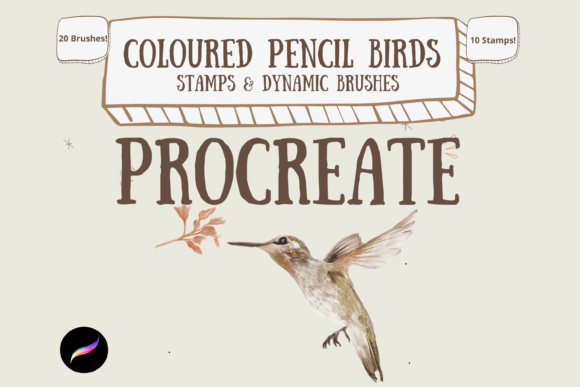
Unlocking Natural Textures with Colour Pencil Birds for Procreate
Digital art has long struggled to replicate the tactile, organic warmth of traditional media. While vector tools offer precision, they often lack the soulful imperfections that make a piece feel handcrafted. This is where Colour Pencil Birds for Procreate steps in, bridging the gap between digital convenience and analog charm. These hand-created digital brushes are not just another addition to your library; they are a specialized toolkit designed to help artists create beautiful, textured bird illustrations that breathe with life. Whether you are an illustrator looking to expand your portfolio or a hobbyist seeking a new creative outlet, understanding how to leverage these tools can transform your workflow.
Beyond the Basic Sketch: Real-World Applications
The utility of this brush pack extends far beyond simple doodling. Because the set includes 30 unique individual digital brushes—split between 10 stamps and 20 dynamic brushes—it offers versatility for various professional and personal projects. Consider the growing market for eco-friendly branding and nature-focused products. Designers creating packaging for organic teas, sustainable clothing lines, or wildlife conservation nonprofits often need imagery that feels grounded and authentic. Using Colour Pencil Birds for Procreate, you can generate assets that mimic the softness of wax-based pencils on rough paper, providing that essential "human touch" that corporate clients increasingly crave.
Another significant scenario is in the realm of children’s book illustration. Publishers and self-publishing authors frequently seek styles that are gentle and inviting. The ability to mix and match these brushes allows for consistent character design while maintaining textural variety. You might use the stamp brushes to quickly lay down foundational shapes for feathers, ensuring anatomical consistency across multiple pages, and then switch to the dynamic brushes to add nuanced shading and depth. This hybrid approach saves hours of manual rendering while preserving the artistic integrity of the piece.
Understanding the Toolkit: Stamps vs. Dynamic Brushes
To get the most out of this pack, it is crucial to understand the distinct roles of its two main components. The 10 stamp brushes serve as powerful accelerators. They can be used alone for quick, decorative elements or as drawing and painting guides. For instance, if you are struggling with the complex geometry of a wing structure, a stamp can provide a underlying framework. You can then lower the opacity of that layer and trace over it with your dynamic brushes, ensuring correct proportions without the stress of freehand drafting.
The 20 dynamic brushes, on the other hand, are the workhorses of the pack. These are designed for the actual act of painting and blending. Unlike static stamps, these brushes respond to your pressure and tilt, mimicking the way a real colored pencil deposits pigment. The key here is interaction. You are not just coloring inside lines; you are building up layers of color. A common observation among users is that these brushes excel when used in conjunction with layer blend modes. By multiplying layers when using paper texture brushes, you can achieve a depth of color that rivals traditional media. This technique allows the grain of the digital paper to show through the pigment, creating a realistic interplay of light and shadow.
Technical Considerations and Workflow Tips
Before diving in, it is important to address the technical requirements. These files are digital brushes that will only work within the Procreate App. This means you must have an iPad Pro (or compatible iPad model) with the Procreate App installed and an Apple Pencil. The tactile feedback of the Apple Pencil is essential for controlling the pressure sensitivity that makes these brushes feel authentic. Without this hardware setup, the nuances of the brush engine cannot be fully utilized.
Installation is another step that often trips up new users. To download and install the files, you will need a platform to host the files, such as iCloud, and a program capable of unzipping them, like iZip. Once you have extracted the files, they can be imported directly into Procreate. It is worth noting that while the initial setup requires a few extra steps compared to standard app downloads, the result is a permanent addition to your creative arsenal that does not rely on internet connectivity once installed.
One of the most powerful features of this pack is its adaptability. The brushes can be resized using the brush resize tool in Procreate, or by using the move and resize tool on your canvas. This flexibility means you can create anything from tiny, intricate details on a hummingbird’s beak to broad, sweeping strokes for larger avian forms. Additionally, the strength of the blend ink charge can be altered by using the opacity slider and blend modes. If a stroke feels too heavy, simply reducing the opacity allows for subtle glazing effects, perfect for capturing the iridescence of bird feathers.
Navigating Limitations and Maximizing Potential
While Colour Pencil Birds for Procreate offers immense creative potential, it is not a magic button for instant mastery. The quality of your output still depends heavily on your understanding of light, form, and color theory. The brushes provide the texture, but you must provide the structure. Users should be aware that relying too heavily on stamps without customizing them can lead to repetitive-looking artwork. The key is to use stamps as a starting point, then disrupt and refine them with dynamic brushes to maintain uniqueness.
Furthermore, the effectiveness of the paper texture integration relies on your choice of background. Using a plain white digital canvas may negate the benefits of the texture brushes. Instead, import high-resolution scans of real watercolor or sketch paper to use as your base layer. When you apply the pencil brushes over this textured background using multiply mode, the digital pigment interacts with the digital paper grain, creating a convincing illusion of traditional media.
Who Benefits Most from This Brush Pack?
This toolset is particularly beneficial for intermediate digital artists who feel stuck in the "smooth digital" aesthetic. If your work looks too clean or plastic-like, these brushes introduce the necessary grit and organic variation. It is also ideal for educators teaching digital illustration, as the stamp features can help students grasp complex forms more quickly. Additionally, graphic designers working on tight deadlines will appreciate the efficiency of the stamp brushes for rapid prototyping of nature-themed concepts.
Ultimately, Colour Pencil Birds for Procreate is about empowering artists to explore a specific niche with confidence. It removes the technical barriers of rendering feathers and textures manually, allowing you to focus on composition and storytelling. By combining the precision of digital tools with the warmth of traditional pencils, you can create pieces that resonate emotionally with viewers, offering a slice of nature’s beauty in a format that is both modern and timeless.