Evaluating the Procreate Brush Stamp: 40 Watercolor Assets for Digital Design
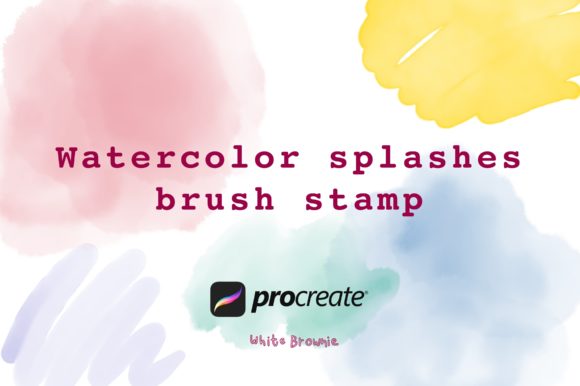
In the rapidly evolving landscape of digital illustration, efficiency often dictates the success of a creative project. For designers, illustrators, and small business owners working within the iPad ecosystem, finding tools that bridge the gap between traditional aesthetic appeal and digital speed is crucial. The Procreate Brush Stamp - 40 Watercolor collection represents a targeted solution for creators seeking to integrate organic, fluid textures into their workflows without the steep learning curve of manual painting. This set includes forty distinct watercolor splashes and stamps, designed specifically for use in Procreate version 5.0 and higher.
Unlike standard brushes that require stroke manipulation to achieve texture, stamp brushes apply a pre-rendered image with a single tap or drag. This distinction is vital for professionals managing tight deadlines. By analyzing the utility, compatibility, and practical application of this asset pack, we can determine its value for various creative disciplines, from wedding stationery design to social media content creation.
Understanding the Mechanics of Stamp Brushes
To appreciate the value of the Procreate Brush Stamp - 40 Watercolor set, one must first understand how stamp brushes function within the Procreate environment. Traditional brushes simulate the behavior of physical tools—such as bristles spreading paint or pencils grinding against paper. Stamp brushes, however, act more like digital stencils or clip-art elements that respond to pressure and tilt. When you press the Apple Pencil to the screen, the brush deposits a complete watercolor shape.
This mechanism offers two primary advantages: consistency and speed. For a marketer creating a series of Instagram quotes, manually painting a unique watercolor background for each post is time-prohibitive. Using a stamp brush allows for the rapid deployment of high-quality textures that maintain a cohesive visual identity. The forty variations included in this pack ensure that repetition does not become obvious, allowing designers to layer multiple splashes to create complex, custom compositions.
Key Characteristics and Technical Specifications
The core offering of this product is its specificity. It is not a general-purpose watercolor kit but a curated collection of forty watercolor splashes. These assets are optimized for iOS devices running Procreate 5.0 or later. It is critical to note the technical limitations upfront: these brushes do not work in Photoshop or other desktop-based graphic design applications. They are proprietary to the Procreate file structure.
The "splash" nature of these stamps suggests irregular, organic edges and varying opacity levels, mimicking the unpredictable flow of water on paper. This randomness is desirable for designs aiming to feel handcrafted rather than digitally rigid. The pack is designed to be lightweight enough for smooth performance on iPads while retaining sufficient resolution for high-quality exports, suitable for both web graphics and print materials like greeting cards.
Practical Applications for Professionals and Creators
The versatility of watercolor textures makes this pack relevant across several industries. Below are specific scenarios where the Procreate Brush Stamp - 40 Watercolor set provides tangible workflow benefits.
Wedding Stationery and Event Design
Wedding invitations, save-the-dates, and menu cards heavily rely on soft, romantic aesthetics. Watercolor florals and abstract washes are industry standards for this niche. With this stamp set, a freelance designer can quickly construct backgrounds or accent elements. Instead of painting each leaf or petal from scratch, the designer can stamp base shapes and then refine them with additional layers. This reduces the turnaround time for client revisions, a common pain point in the wedding industry.
Branding and Logo Development
For entrepreneurs and small business owners, particularly those in lifestyle, wellness, or artisanal sectors, a hand-painted logo element can convey authenticity. While logos typically require vector scalability, many brands use raster-based watercolor elements for secondary branding materials, such as social media headers, packaging labels, or business cards. The forty unique splashes allow for the creation of a bespoke logo mark that feels unique to the brand, avoiding the generic look of stock photography.
Content Creation and Social Media Graphics
Bloggers and marketers need a constant stream of visually engaging content. Quote graphics, promotional banners, and story highlights benefit from textured backgrounds that draw the eye without overpowering the text. Watercolor splashes provide a subtle, artistic backdrop that enhances readability when used with proper contrast. The ability to rapidly generate these backgrounds directly on an iPad allows for on-the-go content creation, a significant advantage for influencers and travel bloggers.
Usability and Workflow Integration
One of the strongest aspects of this asset pack is its ease of integration. Since it operates within Procreate, users can leverage the app’s robust layering system. A typical workflow might involve placing a watercolor stamp on a lower layer, adjusting its opacity to blend with the background, and then adding text or line art on top. The non-destructive nature of digital layers means that mistakes are easily corrected, and colors can be adjusted using clipping masks.
However, users should be aware that stamp brushes require a different technique than standard painting. Pressure sensitivity controls the size and opacity of the stamp, but the shape itself remains fixed. To create variety, users must rotate the canvas, change the brush size, and layer multiple stamps. This requires a shift in mindset from "painting" to "composing." For those accustomed to traditional media, there may be a brief adjustment period to master the placement and scaling of these pre-formed shapes.
Limitations and Considerations
While the Procreate Brush Stamp - 40 Watercolor set is a valuable tool, it is not without limitations. The most significant constraint is its exclusivity to Procreate. Designers who rely on Adobe Illustrator or Photoshop for their final output will need to export their Procreate files as PNGs or PSDs and import them into their primary software. This extra step can disrupt workflows for those who prefer a single-application environment.
Additionally, the pack does not include mock-ups. Users must have their own templates or design structures to showcase how the brushes look in real-world applications. For beginners, this might mean an additional investment in time to learn how to present their work professionally. Furthermore, while forty brushes offer a good range, they may not cover every possible watercolor effect. Complex botanical illustrations may still require custom painting or additional specialized brushes.
Who Benefits Most from This Asset Pack?
This tool is ideally suited for:
- Freelance Graphic Designers: Looking to speed up the creation of textured backgrounds and accents for client projects.
- Small Business Owners: Creating DIY marketing materials, packaging, or product labels without hiring a professional illustrator.
- Wedding and Event Planners: Designing cohesive stationery suites with a handcrafted feel.
- Digital Illustrators: Seeking to add quick atmospheric effects or underpaintings to their detailed works.
- Educators and Bloggers: Producing engaging visual aids and header images for educational content.
Hobbyists who enjoy digital journaling or scrapbooking will also find these stamps useful for adding decorative elements to their digital pages. However, professional fine artists seeking complete control over every brushstroke may find stamp brushes too restrictive for primary artwork, though they remain useful for background textures.
Final Assessment of Value
The Procreate Brush Stamp - 40 Watercolor collection serves as a practical, efficient resource for digital creators. Its value lies not in replacing artistic skill, but in accelerating the production process. By providing high-quality, ready-to-use watercolor textures, it allows designers to focus on composition and messaging rather than the tedious replication of natural media effects.
For those already invested in the Procreate ecosystem, this pack offers a low-risk, high-reward addition to their toolkit. It bridges the gap between the desire for organic, hand-made aesthetics and the demands of modern, fast-paced digital design. While it requires an understanding of its specific mechanics and platform limitations, its potential to enhance productivity and visual appeal makes it a worthy consideration for professionals and serious hobbyists alike. As with any digital asset, its true worth is realized through consistent application in real-world projects, where its flexibility and ease of use can significantly streamline the creative process.