Evaluating the Pw Smile Procreate Brush - Glitter Brush for Digital Illustration
Digital illustration has evolved significantly, moving from flat vector styles to rich, textured compositions that mimic traditional media. Among the most sought-after effects in this space is the realistic rendering of sparkle and shimmer. The Pw Smile Procreate Brush - Glitter Brush enters this market as a specialized tool designed to streamline the process of adding luminous details to digital artwork. For artists working within the iOS ecosystem, understanding the specific utility, limitations, and comparative advantages of this brush set is essential before integrating it into a professional workflow.
This analysis explores the technical attributes of the Pw Smile collection, comparing its approach to manual texture creation and other automated solutions. By examining what is included, how it functions, and where it fits within broader artistic practices, users can make an informed decision about whether this digital product aligns with their creative needs.
Understanding the Product Composition and Technical Specifications
The core of this offering is a single .brushset file contained within a compressed .ZIP archive. Upon downloading, users must extract the file to access the content. It is crucial to note that this product is exclusively compatible with the Procreate application on iOS devices. It does not function with Procreate Pocket, Adobe Fresco, Photoshop, or desktop-based illustration software. This specificity ensures that the brushes are optimized for the touch interface and engine capabilities of the iPad version of Procreate.
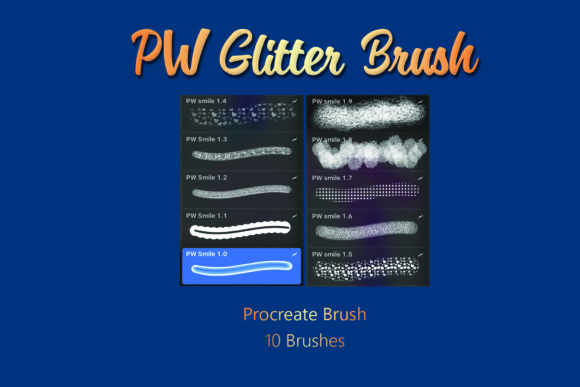
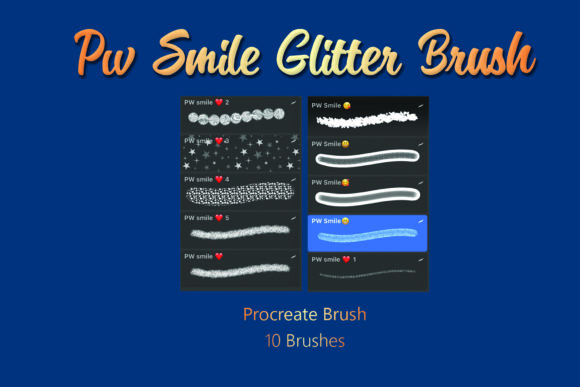
Inside the brushset, users will find 10 distinct glitter brushes. These are not merely variations of a single stamp; they are engineered to provide different densities, particle sizes, and scattering patterns. The distinction between a generic "sparkle" brush and a specialized glitter tool lies in the complexity of the underlying texture maps and the behavior of the stroke dynamics. The Pw Smile brushes aim to replicate the chaotic yet cohesive nature of real glitter, which reflects light at various angles rather than producing a uniform, repetitive pattern.
As a digital product, the delivery method is immediate, but it requires a basic level of technical familiarity. Users must be comfortable managing file downloads and importing custom brushes into Procreate. For those new to this process, the learning curve is minimal, but it is a necessary step that distinguishes this from cloud-based or plugin-driven tools found in desktop environments.
Comparative Analysis: Automated Brushes vs. Manual Texturing
When evaluating the Pw Smile Procreate Brush - Glitter Brush, it is helpful to compare it against the two primary alternatives: manually painting glitter effects and using generic texture overlays.
The Efficiency of Pre-Made Brushes
Manually creating realistic glitter involves painting individual highlights, adjusting opacity layers, and applying noise filters to simulate grain. While this method offers ultimate control, it is time-intensive. The Pw Smile brushes condense hours of manual work into seconds. For commercial illustrators working under tight deadlines, such as those creating greeting cards, social media graphics, or book covers, this efficiency is a significant advantage. The brushes allow for rapid iteration, enabling artists to test different color combinations and densities without rebuilding the effect from scratch.
Limitations Compared to Custom Textures
However, automated brushes come with tradeoffs. A pre-made brushset like Pw Smile offers less granular control over the exact placement of each sparkles compared to manual painting. In high-resolution print work, where every pixel matters, artists may find that the randomized scattering of the brush requires additional refinement. Furthermore, while the 10 brushes provide variety, they represent a fixed library. Artists who require highly specific, bespoke glitter shapes may still need to create custom brushes or combine these tools with manual editing.
Integration with Layer Styles
Unlike static texture images that must be warped and masked to fit a shape, the Pw Smile brushes interact dynamically with the Apple Pencil’s pressure and tilt sensitivity. This allows for organic variation in the stroke, making the glitter appear as though it was applied with a physical tool. This dynamic interaction is a key differentiator from simple PNG overlays, which often look flat and disconnected from the underlying artwork.
Best-Fit Use Cases and Practical Applications
Identifying when to use the Pw Smile Procreate Brush - Glitter Brush depends largely on the project’s scope and style. The following scenarios highlight where this tool excels:
- Fashion Illustration: Rendering sequined fabrics, metallic accessories, or embellished garments benefits greatly from the varied particle sizes in the brushset. The ability to quickly layer different brushes can create depth in fabric textures.
- Holiday and Event Graphics: Designs for New Year’s Eve, Christmas, or birthdays often require heavy use of sparkle elements. The 10-brush variety allows designers to mix fine dust-like glitter with larger, chunky shards for visual interest.
- Fantasy and Magical Effects: For character designs involving magic spells, fairy dust, or enchanted objects, these brushes provide an immediate visual cue for luminosity and energy.
- Product Mockups: When designing packaging for cosmetics or luxury goods, adding subtle glitter accents can enhance the perceived value of the product in digital mockups.
In contrast, this tool may be less suitable for minimalist design projects where clean lines and flat colors are preferred, or for hyper-realistic portraits where glitter is not a focal point. In such cases, the distinct texture of the brushes might clash with the overall aesthetic unless used very sparingly.
Evaluating Value and Decision Factors
For adults aged 20–50 who are researching digital art resources, the decision to purchase the Pw Smile brushset should be based on several practical factors:
- Workflow Compatibility: If your primary tool is Procreate on iPad, this product is directly applicable. If you work across multiple platforms (e.g., switching between iPad and desktop), the lack of cross-platform compatibility may limit its long-term value.
- Frequency of Use: Artists who frequently incorporate sparkle effects will recoup the cost through time saved. Occasional users might find that free alternatives or manual techniques suffice for their needs.
- Customization Needs: The set includes 10 brushes, which is a moderate number. Users who prefer vast libraries with hundreds of variations might find this selection limited. However, a smaller, curated set often reduces decision fatigue and encourages mastery of each brush’s unique characteristics.
- Technical Comfort: Since the product requires extracting a .ZIP file and importing a .brushset, users must be comfortable with these basic file management tasks. Support for installation issues is typically limited with digital products, so self-sufficiency is a prerequisite.
Potential Limitations and Considerations
It is important to acknowledge the constraints of this digital product. First, the visual output is dependent on the user’s skill in blending and layering. Simply applying the brush does not guarantee a professional result; understanding how to adjust opacity, flow, and layer blending modes (such as Screen or Add) is critical for achieving a natural look. Second, because the brushes are raster-based, scaling them up significantly beyond their intended resolution may result in pixelation. Users should test the brushes at their typical canvas sizes to ensure quality.
Additionally, while the term "glitter" implies a specific aesthetic, the actual appearance can vary based on the color palette chosen. Darker backgrounds often enhance the visibility of glitter effects, whereas light backgrounds may require additional contrast adjustments. Artists should experiment with the brushes in different contexts to determine their versatility within their specific style.
Making an Informed Choice
The Pw Smile Procreate Brush - Glitter Brush represents a targeted solution for a specific artistic challenge. It is not a universal tool for all illustration needs, but rather a specialized asset for enhancing luminosity and texture. For Procreate users seeking to elevate their digital paintings with efficient, high-quality sparkle effects, this brushset offers a balanced combination of variety and ease of use.
Before purchasing, consider your current workflow. If you find yourself spending excessive time manually painting highlights or searching for suitable texture overlays, this product may streamline your process. However, if you prefer total control over every element or work primarily in non-Procreate environments, alternative methods may be more appropriate. By weighing the efficiency gains against the limitations of customization and platform exclusivity, artists can determine if this digital resource aligns with their creative goals.
Ultimately, the value of the Pw Smile brushset lies in its ability to bridge the gap between complex manual techniques and the demand for rapid digital production. For those willing to integrate it thoughtfully into their layered workflows, it serves as a potent addition to the digital artist’s toolkit.