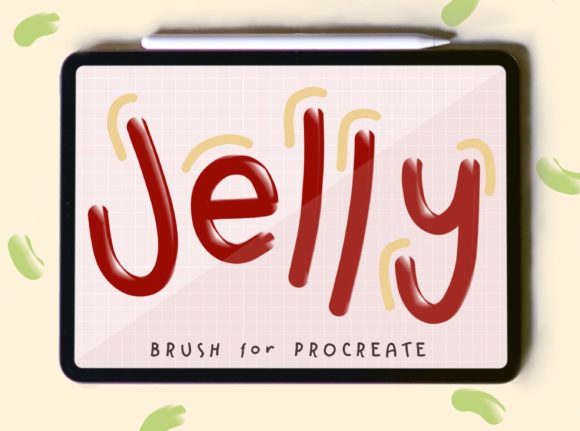
Jelly Brush for Procreate: Glossy Art
Digital illustration has evolved far beyond simple line work and flat color fills. Today’s audiences crave texture, depth, and tactile realism that jumps off the screen. Achieving that slick, wet, or gelatinous look manually can be a tedious process involving multiple layers, complex blending modes, and hours of highlighting. This is where specialized tools become essential. The Jelly Brush for Procreate Glossy Brush offers a streamlined solution for artists who want to incorporate high-shine, semi-transparent textures into their workflow without sacrificing efficiency.
This set is not just another generic texture pack; it is a curated collection designed specifically for the unique engine of Procreate on iPad. By understanding how these brushes function and how to integrate them into your existing style, you can elevate everything from character design to product mockups with minimal effort.
Understanding the Glossy Aesthetic
The appeal of glossy, jelly-like textures lies in their ability to convey volume and materiality instantly. Whether you are drawing a piece of hard candy, a dewdrop on a leaf, or a futuristic glass interface, the way light interacts with the surface tells the viewer what the object feels like. Traditional digital painting requires you to manually paint specular highlights, subsurface scattering, and refraction. While this is a valuable skill, it is time-consuming.
The Jelly Brush for Procreate Glossy Brush automates much of this light behavior. These brushes are engineered to mimic the physical properties of viscous, transparent materials. They allow you to lay down base colors that retain a inherent sheen, which reacts dynamically to your pressure and tilt. This means you spend less time rendering reflections and more time focusing on composition and color theory.
Creative Applications Across Industries
The versatility of this toolset extends far beyond simple still-life paintings. Different creative professionals can adapt these brushes to meet specific project goals.
Character Design and Illustration
For character artists, adding glossy elements can bring a figure to life. Think of the wet look of eyes, lips, or sweat on skin during an action sequence. Using the jelly brushes, you can add these details with a few strokes rather than building them up layer by layer. Additionally, they are perfect for designing characters with slime, gel, or liquid-based powers, providing a consistent texture that matches the creature’s biology.
Product Design and Mockups
Graphic designers and marketers often need to create appealing visuals for cosmetics, beverages, or tech products. A bottle of perfume or a sleek smartphone screen requires realistic reflections to look premium. Instead of relying solely on 3D renders, you can use these brushes to add high-quality gloss overlays to 2D illustrations. This approach allows for faster iteration when presenting concepts to clients, as you can quickly adjust colors and opacity to match brand guidelines.
UI and Web Design Elements
The "glassmorphism" trend in user interface design relies heavily on translucent, frosted, and glossy effects. While CSS can handle some of this, custom illustrations for apps and websites benefit from hand-drawn glossy icons and buttons. These brushes enable UI designers to create unique, organic-looking interface elements that stand out from standard flat design libraries.
Maximizing the Set of 5 Jelly Brushes
The download includes a Set of 5 Jelly Brush for procreate, each serving a distinct purpose in the rendering pipeline. Understanding the role of each brush helps you maintain organization and consistency in your artwork.
- Base Jelly: Use this for laying down the initial transparent color. It provides the foundational hue and slight transparency needed for subsurface scattering effects.
- Highlight Gloss: This brush is designed for sharp, bright reflections. It works best on small areas where light hits directly, such as the curve of a candy or the tip of a droplet.
- Soft Sheen: Ideal for broader, diffused highlights. Use this to blend the hard edges of your base color into the surrounding environment, creating a smoother transition.
- Texture Detail: This variant adds subtle imperfections or bubbles within the jelly material, breaking up uniformity and adding realism.
- Edge Define: Use this to sharpen the boundaries of your glossy object, ensuring it doesn’t look too muddy against the background.
Because these brushes were made specifically for PROCREATE and will not work with any other program, you can trust that they are optimized for the Apple Pencil’s pressure sensitivity. They have only been tested with an Apple Pencil, ensuring that the stroke dynamics feel natural and responsive on iPad devices.
Practical Workflow Tips
To get the most out of your Jelly Brush for Procreate Glossy Brush, consider adopting a structured workflow. Start by sketching your shape on a separate layer. Once satisfied, create a new layer for the base color. Select the Base Jelly brush and choose your desired hue. Remember that you can use these in any color or opacity, so don’t be afraid to experiment with non-traditional colors like neon greens or deep purples for a sci-fi aesthetic.
Next, resize the brush to best fit your art. Larger brushes work well for broad strokes on big objects, while smaller sizes allow for precise detailing on intricate elements. Layering is key. Build up the intensity of the gloss gradually. If the effect looks too strong, lower the layer opacity or switch to a softer blending mode like "Overlay" or "Soft Light."
Consistency is crucial when working on a series of illustrations. Save your favorite color palettes and brush settings as defaults. This ensures that if you are creating a set of icons or a comic strip, the glossy elements look cohesive throughout the project.
Technical Considerations and File Management
When you purchase this tool, your download includes 1 .Brushset file in ZIP file that containing 5 Jelly Brushes. It is important to note that THIS IS A DIGITAL PRODUCT NO PHYSICAL PRODUCT WILL BE DELIVERED. After downloading, unzip the file and import the .brushset directly into Procreate. This keeps your brush library organized and makes it easy to back up your tools.
Since these brushes rely on Procreate’s specific rendering engine, they offer performance benefits over generic image stamps. They are lightweight and do not bloat your file size unnecessarily, allowing for smooth zooming and panning even on complex illustrations.
Adapting to Your Audience
Consider who will be viewing your final artwork. For a younger audience, bright, saturated jelly textures can evoke playfulness and fun, perfect for game assets or children’s book illustrations. For a corporate or luxury audience, subtler, more refined gloss effects can convey sophistication and quality. Adjust the opacity and color saturation of your brushes to align with the emotional tone you wish to convey.
Freelancers and small business owners can use these brushes to create eye-catching social media content. A glossy, vibrant illustration stops the scroll and engages viewers more effectively than flat, monochrome graphics. By integrating these tools into your daily creative routine, you enhance both the speed and quality of your output.
In conclusion, the Jelly Brush for Procreate Glossy Brush is more than a novelty; it is a practical asset for modern digital creators. It bridges the gap between technical rendering skills and artistic expression, allowing you to focus on creativity while handling the complexities of light and texture. Whether you are a hobbyist exploring new styles or a professional designer meeting tight deadlines, this set provides the flexibility and quality needed to produce stunning, glossy artwork.