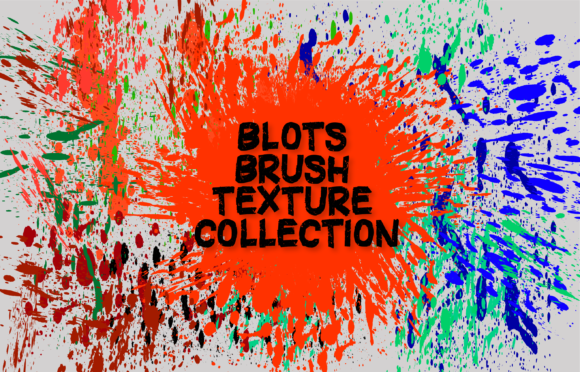
Mastering Organic Textures with the Blots Brush Texture Collection for Adobe Illustrator
In the evolving landscape of digital design, the demand for authentic, hand-crafted aesthetics has never been higher. Designers across industries are constantly seeking ways to break away from the sterile perfection of vector graphics, aiming instead for visuals that possess warmth, character, and a human touch. This is where specialized tools like the Blots Brush Texture Collection become invaluable assets in a creative professional’s toolkit. By bridging the gap between traditional media spontaneity and digital precision, this collection allows creators to infuse their projects with organic imperfections that resonate deeply with modern audiences.
The appeal of blot-style textures lies in their versatility and emotional impact. Unlike rigid geometric shapes, blots suggest movement, fluidity, and chance. They can serve as subtle background elements that add depth without distracting from primary content, or they can act as bold, expressive focal points in branding and illustration. Understanding how to effectively integrate these textures into your workflow requires not just the right tools, but also an appreciation for the nuances of digital brush mechanics within vector environments.
The Advantage of Vector-Based Organic Textures
One of the most significant advantages of using the Blots Brush Texture Collection is its foundation in Adobe Illustrator. For many designers, the instinct might be to turn to raster-based programs like Photoshop for textural work. However, working with vectors offers distinct benefits that are crucial for scalable, high-quality design. When you create background blots using vector brushes, every curve and edge remains mathematically defined. This means your textures can be scaled infinitely—from a small business card to a massive billboard—without any loss of resolution or clarity.
This scalability is particularly important for brand identity systems. A logo or brand pattern that incorporates organic blot elements needs to look crisp on a mobile screen and equally sharp on printed packaging. Raster textures often pixelate when enlarged, requiring complex workarounds or multiple file versions. With Illustrator CC brushes, the integrity of the design is maintained regardless of size. Furthermore, vector files are typically smaller in file size compared to high-resolution raster images, leading to faster load times for web assets and more manageable project files for print production.
Workflow Efficiency and Creative Freedom
Time is a critical resource in any design project. The Blots Brush Texture Collection is engineered to streamline the creative process, allowing designers to achieve complex textural effects in minutes rather than hours. The brushes are designed to be intuitive and responsive, reducing the learning curve significantly. You do not need to be an expert illustrator to produce professional-grade results. The process is straightforward: select the desired brush, adjust the color to match your palette, modify the size to fit your composition, and experiment with opacity levels to achieve the desired level of subtlety or boldness.
The ability to quickly iterate is perhaps the greatest benefit of this workflow. In traditional media, creating a specific blot effect might require multiple attempts with physical ink and paper, followed by scanning and cleaning up the digital file. With these digital brushes, you can generate dozens of variations in seconds. If a blot feels too heavy, you simply lower the opacity. If it is the wrong shape, you delete it and try again. This rapid experimentation encourages playfulness and helps designers discover unexpected compositions that might not have emerged through a more rigid, planned approach.
Customization Through Opacity and Layering
While the brushes themselves provide the foundational shape, the true magic happens when you manipulate their properties. Opacity is a powerful tool in creating depth. By layering multiple blots with varying levels of transparency, you can create rich, complex textures that mimic the look of watercolor washes or ink stains. This technique adds a sense of history and layering to flat designs, making them feel more tactile and engaging.
For example, a designer working on a poster for a jazz festival might use deep blue blots at 20% opacity as a background layer to set a moody tone. Over this, they could place sharper, darker blots at 80% opacity to create visual interest and guide the viewer’s eye toward the headline. The interplay between these layers creates a dynamic visual rhythm that static colors cannot achieve. The Blots Brush Texture Collection facilitates this layering process by providing a consistent yet varied set of shapes that harmonize well when stacked.
Practical Applications Across Industries
The utility of organic blot textures extends far beyond fine art illustration. Their adaptability makes them suitable for a wide range of commercial and educational applications. Understanding where and how to apply these textures can elevate the effectiveness of communication in various sectors.
- Branding and Identity: Modern brands often seek to appear approachable and authentic. Incorporating blot textures into logos, business cards, and packaging can soften corporate imagery, making brands feel more human and relatable. This is particularly effective for businesses in the wellness, food, and artisanal sectors.
- Editorial Design: Magazines and online publications use textures to break up text-heavy layouts. Background blots can define sections, highlight quotes, or add visual interest to white space without overwhelming the reader. The organic nature of blots complements typography well, adding contrast to structured grids.
- Educational Materials: Educators and instructional designers can use these textures to make learning materials more engaging. Soft, colorful blots can frame important information, create playful headers, or illustrate concepts in science and art classes, helping to maintain student attention.
- Social Media Content: In the fast-paced world of social media, standing out is essential. Unique textural backgrounds can make posts more visually appealing and stop users from scrolling past. The quick generation time of these brushes allows social media managers to produce fresh, unique visuals daily.
Technical Requirements and Compatibility
To ensure optimal performance and compatibility, it is essential to adhere to specific technical requirements when using the Blots Brush Texture Collection. These brushes are developed specifically for Adobe Illustrator CC and later versions. This distinction is critical because earlier versions of Illustrator may not support the advanced brush dynamics and rendering capabilities required to display the textures correctly. Attempting to use these brushes in older software could result in distorted shapes or missing features.
It is equally important to note what this product is not. These brushes are NOT for Photoshop. While Photoshop is a powerful tool for image editing, it operates on a raster basis, which is fundamentally different from the vector environment of Illustrator. Users expecting to import these .ai brush files into Photoshop will find them incompatible. This specialization ensures that the brushes are optimized for vector workflows, leveraging the strengths of Illustrator’s engine to produce clean, scalable paths.
When you purchase the collection, you receive a single zipped file containing two key components: the brush file for Adobe Illustrator CC and a comprehensive PDF help file. The help file provides step-by-step instructions on how to install the brushes, ensuring that even users who are new to custom brush libraries can get started quickly. Proper installation is crucial for the brushes to appear in your brush panel and function as intended.
Maximizing the Potential of Your Toolkit
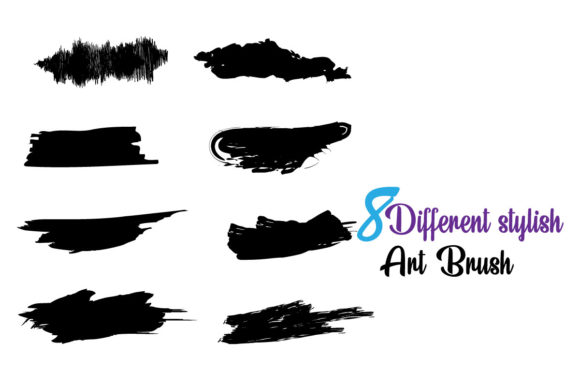
To get the most out of the Blots Brush Texture Collection, designers should adopt a mindset of exploration. Do not limit yourself to the default settings. Experiment with combining different brushes from the set of eight to create hybrid textures. Try rotating the brushes to change the direction of the stroke, or use the width tool in Illustrator to vary the thickness of the blot dynamically. These small adjustments can significantly expand the visual vocabulary available to you.
Additionally, consider the color psychology associated with your blots. A soft pastel blot conveys calmness and gentleness, while a stark black ink blot suggests authority and drama. By aligning the texture’s appearance with the emotional tone of your project, you enhance the overall communicative power of your design. The ease of changing colors in Illustrator allows you to test multiple palettes rapidly, ensuring that the final choice supports your design objectives.
In conclusion, the integration of organic textures into digital design is no longer just a trend; it is a fundamental aspect of creating resonant, human-centered visuals. The Blots Brush Texture Collection offers a practical, efficient, and versatile solution for designers seeking to add this layer of authenticity to their work. By leveraging the power of vector graphics in Adobe Illustrator CC, creators can produce scalable, high-quality textures that enhance branding, editorial layouts, and digital content. With its user-friendly interface and robust customization options, this tool empowers professionals and hobbyists alike to explore new creative horizons with confidence and ease.