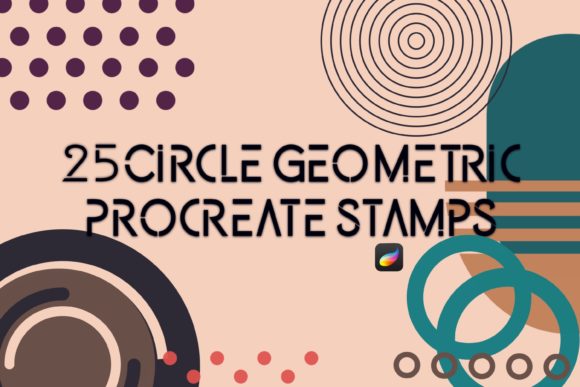
Mastering Precision: A Guide to 25 Procreate Circle Geometric Shapes and Stamps
In the evolving landscape of digital illustration, precision often competes with organic expression. For artists working within the iPad ecosystem, particularly those using Procreate, the demand for clean, scalable geometric elements has grown significantly. Whether you are designing user interfaces, creating technical diagrams, or adding structural balance to abstract compositions, having reliable tools is essential. This is where specialized resources like 25 Procreate Circle Geometric Shapes and accompanying stamp brushes come into play. These tools are not merely shortcuts; they are foundational assets that can streamline workflow and enhance the professional quality of digital artwork.
Understanding the Core Utility of Geometric Shape Brushes
At first glance, a circle seems simple. However, drawing a perfect circle freehand is notoriously difficult, even for seasoned illustrators. While Procreate’s built-in QuickShape feature allows users to hold their pencil to snap lines and curves into perfect geometries, it has limitations. It requires manual adjustment for size, position, and stroke weight every single time. This is where a dedicated brush set, such as 25 Procreate Circle Geometric Shapes, offers a distinct advantage. These brushes are pre-configured to deliver consistent, mathematically perfect circles instantly upon contact with the canvas.
The primary distinction of this specific collection lies in its variety and readiness. Rather than offering a single generic circle, a set of twenty-five variations typically includes different line weights, dashed outlines, dotted patterns, and filled solids. This diversity allows artists to layer shapes without needing to adjust settings mid-flow. For professionals who value efficiency, the ability to switch between a thin architectural guideline and a bold graphic element with a single tap is invaluable. It transforms the creation of geometric backgrounds from a tedious task into a fluid, creative process.
Comparing Dedicated Shape Brushes to Native Tools
When evaluating whether to invest in or download a specialized shape brush set, it is crucial to compare it against native alternatives. The most common alternative is the aforementioned QuickShape feature. QuickShape is excellent for spontaneous sketching where the exact dimensions are not predetermined. It feels natural and integrates seamlessly with the Apple Pencil’s pressure sensitivity. However, it lacks repeatability. If you need ten identical circles spaced evenly across a canvas, QuickShape requires ten separate actions and adjustments.
In contrast, 25 Procreate Circle Geometric Shapes function as stamps or single-stroke brushes. This means every mark made is identical to the last, ensuring uniformity. This is critical for pattern design, technical illustrations, and UI mockups where consistency is paramount. Another alternative is importing vector shapes from external software like Adobe Illustrator. While vectors offer infinite scalability, the workflow of exporting, importing, and rasterizing can break creative momentum. Dedicated Procreate brushes keep the artist within the app, maintaining focus and reducing friction.
There is also the option of using basic round brushes with stabilization turned up high. While this can produce smoother circles, it rarely achieves mathematical perfection and still requires significant manual control. The trade-off here is clear: native tools offer flexibility and spontaneity, while specialized shape brushes offer precision, speed, and consistency. The right choice depends entirely on the project’s requirements.
Ideal Use Cases for Circle Geometric Stamps
Understanding when to use these tools is just as important as knowing how they work. The versatility of 25 Procreate Circle Geometric Shapes makes them suitable for a wide range of disciplines. Here are some practical scenarios where these brushes excel:
- Digital Planning and Journaling: Many users create digital planners on iPads. Circles are fundamental for checkboxes, bullet points, and decorative headers. Using stamp brushes ensures that every page layout remains clean and aligned.
- Infographic Design: When visualizing data, artists often need concentric circles, pie chart segments, or node connectors. A varied set of geometric shapes allows for rapid prototyping of these elements without leaving the drawing app.
- Abstract and Minimalist Art: Contemporary digital art often relies on geometric abstraction. Artists can layer multiple circle stamps with varying opacity and blend modes to create complex, depth-rich compositions that would be time-consuming to draw by hand.
- Technical Diagrams and Schematics: Engineers and educators creating instructional content need precise symbols. Dashed circles for hidden lines or solid circles for connection points can be stamped instantly, improving the clarity of technical drawings.
Each of these use cases benefits from the "set it and forget it" nature of stamp brushes. Once the brush is selected, the artist can focus on composition and color rather than the mechanics of drawing a perfect curve.
Evaluating Limitations and Trade-offs
While highly efficient, specialized shape brushes are not a panacea. One significant limitation is flexibility in deformation. A stamp brush creates a static image. If you need an ellipse or a distorted circle, you must use the transform tool after stamping, which adds steps back into the workflow. Native drawing tools allow for organic variation in line weight and shape that stamps cannot replicate without extensive editing.
Additionally, resolution can be a concern. Most Procreate brushes are raster-based. If a user creates a very small circle and then scales it up significantly, pixelation may occur. High-quality sets like 25 Procreate Circle Geometric Shapes are usually optimized to mitigate this by providing high-resolution source images, but users must still be mindful of canvas size and intended output dimensions. For large-format prints, it is often safer to create shapes at a larger scale and scale down, rather than the reverse.
Another trade-off is the potential for repetitive aesthetics. Over-reliance on perfect geometric stamps can make artwork feel sterile or mechanical. Successful integration often involves combining these precise shapes with hand-drawn elements or textured brushes to maintain a human touch. The best results come from using geometric tools as a skeleton or framework, rather than the entire substance of the piece.
Decision Factors: Choosing the Right Resource
When deciding whether 25 Procreate Circle Geometric Shapes is the right addition to your toolkit, consider your typical workflow. If you frequently find yourself correcting imperfect circles or spending excessive time aligning shapes, this resource will likely yield a high return on investment in terms of time saved. It is particularly beneficial for those who work in styles that prioritize clean lines and structural integrity.
However, if your work is primarily expressive, gestural, or painterly, the utility of geometric stamps may be limited. In such cases, investing in high-quality texture brushes or custom palettes might be more impactful. It is also worth considering the specific variations included in the set. Does it offer the specific line weights you need? Are there dashed or dotted options that match your style? Reviewing the contents carefully ensures that the tool solves your specific problems rather than adding clutter to your brush library.
Furthermore, consider the learning curve. While simple to use, integrating new brushes effectively requires experimentation. Users should dedicate time to testing blend modes, opacity settings, and layering techniques to unlock the full potential of the set. Many artists find that combining a solid circle stamp with a textured overlay brush creates a unique aesthetic that balances precision with organic feel.
Integrating Stamps into a Professional Workflow
To maximize the value of 25 Procreate Circle Geometric Shapes, integrate them into a structured workflow. Start by organizing your brush library so that these tools are easily accessible during the initial sketching or layout phase. Use them to establish the underlying geometry of your composition. Once the structure is in place, you can lower the opacity of these guide layers and draw over them with more expressive tools, or keep them visible as part of the final design.
Layer management is also key. Keep geometric elements on separate layers from hand-drawn details. This allows for non-destructive editing, meaning you can move, resize, or recolor the geometric shapes without affecting the rest of your artwork. This modular approach is standard in professional digital design and facilitates easier revisions and client feedback.
Ultimately, tools like 25 Procreate Circle Geometric Shapes and 25 Circle Geometric Shapes Stamps Brushes for Procreate are enablers of creativity. They remove technical barriers, allowing artists to focus on vision and execution. By understanding their strengths, limitations, and ideal applications, users can make informed decisions that enhance their digital artistry. Whether you are a designer seeking efficiency or an artist exploring new forms, these geometric resources offer a practical pathway to greater precision and professional polish.