Streamlining Dynamic Art with the Speedlines Stamp Set for Procreate
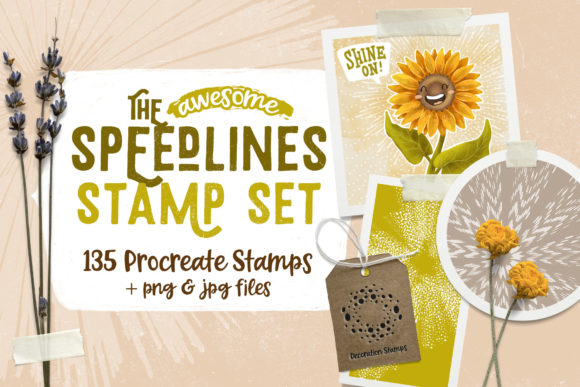
In the fast-paced world of digital illustration, efficiency often dictates the quality and volume of output. For artists working in comics, manga, or dynamic graphic design, rendering motion lines, speed effects, and atmospheric backgrounds manually can be a significant bottleneck. The Speedlines Stamp Set for Procreate emerges as a targeted solution to this specific workflow challenge. Rather than functioning as a traditional painting brush, this asset operates as a library of pre-rendered stamps designed to inject energy and movement into artwork instantly. By integrating 135 distinct elements directly into the Procreate ecosystem, this toolset allows creators to bypass the tedious process of drawing repetitive linear effects by hand, offering a pragmatic approach to enhancing visual storytelling.
The Mechanics of Digital Efficiency
The core value proposition of the Speedline Stamp Set lies in its ability to accelerate the production pipeline. In professional illustration, time spent on secondary details—such as background textures, motion blurs, and impact lines—is time subtracted from primary character design and composition. This stamp set addresses that imbalance. Upon installation, users gain immediate access to a diverse array of graphical elements that can be placed, resized, and rotated with the intuitive touch controls native to the iPad.
The set includes 135 unique brush stamps. These are not merely variations of a single line; they encompass a wide spectrum of stylistic choices suitable for different artistic directions. From sharp, angular bursts typical of action manga to softer, flowing lines found in Western comics, the variety ensures that the tool does not force a uniform look across all projects. The versatility extends beyond traditional illustration. Marketers and social media content creators can utilize these assets to add dynamic flair to promotional graphics, while digital scrapbookers might employ them to create layered, textured collages. The utility is broad because the fundamental concept—adding motion and depth—is universally applicable in visual design.
Quality and Usability in Real-World Workflows
When evaluating any digital asset, consistency and ease of integration are paramount. The Speedlines Stamp Set for Procreate is designed specifically for the iPad environment, leveraging the software’s native stamp functionality. This means there is no complex setup required. Users simply import the brush set, and the elements become immediately available within the brush library. This plug-and-play nature is crucial for professionals who need to switch between tools rapidly without troubleshooting compatibility issues.
The visual quality of the stamps is high, featuring clean edges and transparent backgrounds where appropriate. This transparency is vital for layering. An artist can place a speedline effect over a character without obscuring underlying details, allowing for non-destructive editing. The ability to adjust opacity and blend modes further enhances this flexibility. For instance, setting a stamp to "Multiply" or "Overlay" can help it integrate seamlessly with colored backgrounds, making the effect feel like part of the scene rather than a sticker placed on top.
However, it is important to note the technical constraints. The brush set functions exclusively within Procreate on the iPad. It does not operate in Photoshop, Clip Studio Paint, or other desktop-based illustration software. For artists whose workflow is strictly desktop-bound, this specific brush file is unusable. Yet, the creators have anticipated this limitation by including alternative file formats. The package contains all 135 elements in both PNG (with transparent backgrounds) and JPG (with white backgrounds) formats. This inclusion significantly broadens the asset's accessibility. Users without Procreate, or those working in different software environments, can still utilize the visual elements by importing them as standard image files. This dual-format approach demonstrates a thoughtful consideration of diverse user needs.
Applications Across Creative Disciplines
The practical application of this stamp set extends far beyond comic book panels. While manga and comic artists are the most obvious beneficiaries, the utility of dynamic lines translates effectively into other creative fields.
- Lettering and Typography: Graphic designers and lettering artists can use these stamps to create energetic backgrounds for text. A bold headline paired with subtle speedlines can convey urgency or excitement, making it ideal for poster design, album covers, or YouTube thumbnails.
- Digital Scrapbooking and Collage: The JPG and PNG files allow for easy integration into mixed-media projects. Artists can layer these elements to add texture and movement to static compositions, creating a sense of depth and narrative flow.
- Photo Editing and Enhancement: Photographers and digital artists can "pimp up" static photos by overlaying these effects. Whether adding a sense of wind to a portrait or motion to a vehicle shot, the stamps provide a quick way to introduce dynamic elements without advanced photo manipulation skills.
- Marketing and Social Media: Content creators often need to produce eye-catching visuals quickly. Using pre-made speedlines can help static product shots or announcements stand out in crowded social feeds, drawing the viewer’s eye to the focal point.
Evaluating Long-Term Value and Limitations
From a professional standpoint, the long-term value of the Speedlines Stamp Set for Procreate depends on the frequency with which an artist requires motion effects. For those who regularly produce action-oriented content, the time saved is substantial. What might take thirty minutes to draw manually can be achieved in seconds using stamps. Over the course of multiple projects, this accumulation of saved hours translates into significant economic value for freelancers and studio artists alike.
Nevertheless, there are limitations to consider. Relying heavily on stamps can risk a generic aesthetic if not customized. Because these are pre-made assets, there is a possibility that other artists may use identical elements. To maintain a unique voice, professionals should treat these stamps as a base layer rather than a final solution. Adjusting color, opacity, rotation, and combining multiple stamps can help create custom variations that feel bespoke. Additionally, while the set is versatile, it may not cover every niche stylistic requirement. Artists working in highly abstract or hyper-realistic styles may find the stylized nature of the speedlines less applicable.
Another consideration is the learning curve associated with effective placement. While the tool is easy to install, mastering the art of integrating speedlines so they look natural within a composition requires practice. Poorly placed effects can distract from the main subject rather than enhance it. Therefore, this tool is best viewed as an aid to skilled artists rather than a replacement for fundamental design knowledge.
Who Should Consider This Asset?
The Speedline Stamp Set is particularly well-suited for:
- Comic and Manga Artists: Who need to maintain consistent pacing and dynamic energy across numerous pages.
- Illustrators on Tight Deadlines: Who need to reduce production time without sacrificing visual impact.
- Digital Hobbyists: Who want to elevate their fan art or personal projects with professional-looking effects.
- Graphic Designers: Seeking quick, scalable assets for motion-themed layouts.
For professionals who already work extensively within the Procreate ecosystem on iPad, this set integrates seamlessly into existing workflows. It complements other brushes and tools rather than replacing them. For those outside the Procreate ecosystem, the included PNG and JPG files still offer value, though the convenience factor is reduced.
Final Thoughts on Workflow Integration
The Speedlines Stamp Set for Procreate represents a practical investment for digital creators seeking to optimize their workflow. It addresses a specific pain point—the time-consuming nature of drawing manual motion effects—with a straightforward, high-quality solution. By providing 135 varied elements in multiple formats, it offers flexibility that accommodates both iPad-centric illustrators and broader digital artists. While it requires thoughtful application to avoid a cookie-cutter appearance, its potential to enhance productivity and visual appeal is evident. For artists looking to add punch and professionalism to their comics, lettering, or digital collages, this toolset provides a reliable, efficient means to achieve dynamic results.